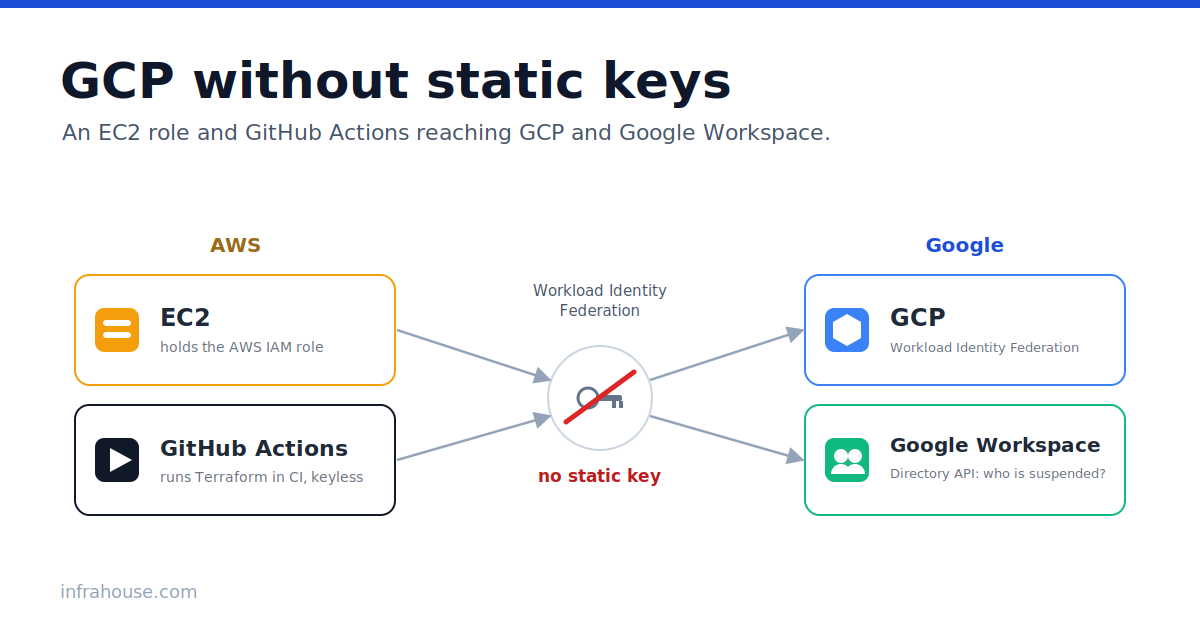
We run OpenVPN so employees can reach internal resources. Authentication goes through Google Workspace. An employee with a Google account opens the VPN portal, downloads a config with a client certificate, and connects.
When an employee leaves, that config keeps working. It stops only when we revoke the certificate, and until recently we did that by hand. Manual revocation is a pain. Offboarding already interrupts whatever you were doing, and this is one more step to remember. If you forget it, the access stays open.
So I decided to automate it. The plan is to sync Google Workspace with the OpenVPN certificate database. When Workspace suspends a user, the server revokes that user’s certificate. For that, the server has to ask Workspace one thing, which users are suspended, and that means reading the Google Directory API.
The usual way to authenticate to the Directory API is to create a service account, download its JSON key, and read the key at runtime. I didn’t want a key on the instance.
A service account key doesn’t expire. Once the file exists, whoever reads it has the service account’s permissions: on a laptop, in a backup, in a chat message, or in old git history. Storing one safely is its own discipline. So I set it up with no key at all. Not on the EC2 instance, and not in the GitHub Actions CI that builds and tests the module.
In this post I will show how to authenticate to GCP without a static key, from two places: a GitHub Actions runner and an EC2 instance. The second case reads Workspace as an administrator, so it also needs domain-wide delegation. Most guides implement delegation with a key. This post does it without one.
The whole chain starts on a laptop with an admin account. The laptop bootstraps GitHub Actions, and GitHub Actions stands up what the EC2 instance needs. That’s the order below: laptop, then GitHub Actions, then EC2.
The idea both cases share
Google’s Workload Identity Federation lets you tell Google to trust an external identity provider directly. AWS is on the list. So is GitHub Actions. Instead of a secret that proves the caller is the service account, the workload proves it is a specific identity it already has, an EC2 instance role or a GitHub repository. Google was told in advance that this identity may act as a particular service account, so it returns a short-lived token.
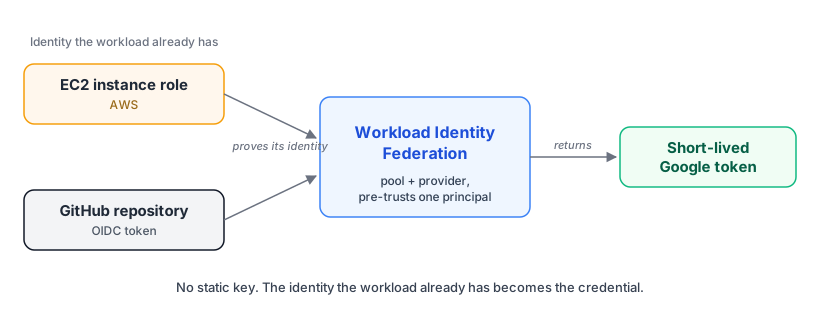
One credential, two sources. The identity a workload already holds, an EC2 role or a GitHub repository, is exchanged for a short-lived Google token, and no key changes hands.
The identity the workload already has becomes the credential. The GitHub runner already has an OIDC token from GitHub. The EC2 instance already has its IAM role. There is nothing new to store and nothing to rotate.
On day zero none of these identities can federate yet, because the Google side does not exist. So we start where everything starts, on a laptop.
Bootstrap GCP from a laptop
The one thing that must already exist is a project, with billing enabled and your email as its owner.
The project is the container for everything below, and example-project in the code is a placeholder for
its ID. If it does not exist yet, create it once with gcloud projects create example-project and link a
billing account. The Terraform below does not create the project itself, because that needs org-level
permissions. It manages what lives inside one.
The laptop is already keyless. Install the gcloud CLI and log in with your own Google account:
# Install gcloud (macOS)
brew install --cask google-cloud-sdk

# Log in as yourself, twice: once for the CLI, once for Application Default
# Credentials that Terraform reads. Both open a browser.
gcloud auth login
gcloud auth application-default login
That last command ends with a warning, and it looks alarming the first time:
WARNING:
Cannot find a quota project to add to ADC. You might receive a "quota exceeded"
or "API not enabled" error. Run $ gcloud auth application-default
set-quota-project to add a quota project.
Ignore it on a laptop. The quota project is the project billed for quota and checked for enabled APIs, and
gcloud sends it as an x-goog-user-project header. Terraform targets the project explicitly, so the
bootstrap does not need one. If the warning bothers you, set it with gcloud auth application-default set-quota-project example-project. Do not carry that into CI. That same header is what breaks
impersonation later, in the USER_PROJECT_DENIED trap: with your own credentials it is checked against you
and passes, but under federation it is checked against the federated principal and fails.
That login does write a file, ~/.config/gcloud/application_default_credentials.json, and it is worth
knowing what it is, because it is not a service account key. Its type is authorized_user: a client id
and a refresh token for your Google identity. It represents you, not a machine. It only ever hands out
short-lived access tokens, your account’s login and session policy govern it, and you or an admin can
revoke it with gcloud auth application-default revoke.
A service account key is the other thing entirely. Its type is service_account, it embeds a private key
that signs as a machine with no human behind it, and it does not expire. That is the file you never put on
a server, and if GOOGLE_APPLICATION_CREDENTIALS points at one on your laptop, it is the first static key
to delete. The user credential above is not that. It is you, logged in.
Then point gcloud at your project:
gcloud config set project example-project
Now the laptop creates the first resources, so GitHub Actions can take over. I keep this in a small Terraform repo. It enables the APIs and stands up the GitHub federation with the CI service account that GitHub Actions will impersonate.
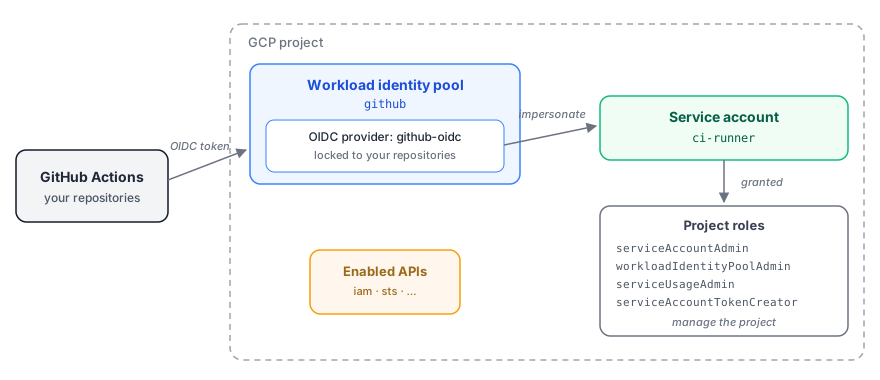
What day zero builds. A GitHub-locked identity pool and a CI service account the repositories impersonate, plus the project roles it holds and the APIs everything needs.
You can create these two ways. I recommend Terraform, because you will manage this project as code from here on. The gcloud commands do the same thing if you would rather see each resource made by hand.
Terraform (recommended)
locals {
  project = "example-project"

  # Repositories allowed to authenticate to GCP via GitHub OIDC.
  github_repos = [
    "my-org/vpn-a",
    "my-org/vpn-b",
  ]

  # CEL list for the attribute condition: 'my-org/vpn-a', 'my-org/vpn-b'
  repo_list = join(", ", [for r in local.github_repos : "'${r}'"])
}

# APIs everything below needs.
resource "google_project_service" "apis" {
  for_each = toset([
    "iam.googleapis.com",
    "iamcredentials.googleapis.com",
    "sts.googleapis.com",
    "cloudresourcemanager.googleapis.com",
  ])
  project            = local.project
  service            = each.value
  disable_on_destroy = false
}

# The GitHub Actions federation.
resource "google_iam_workload_identity_pool" "github" {
  project                   = local.project
  workload_identity_pool_id = "github"
  display_name              = "GitHub Actions"

  depends_on = [google_project_service.apis]
}

resource "google_iam_workload_identity_pool_provider" "github" {
  project                            = local.project
  workload_identity_pool_id          = google_iam_workload_identity_pool.github.workload_identity_pool_id
  workload_identity_pool_provider_id = "github-oidc"

  oidc {
    issuer_uri = "https://token.actions.githubusercontent.com"
  }

  attribute_mapping = {
    "google.subject"       = "assertion.sub"
    "attribute.repository" = "assertion.repository"
  }

  # Any repository in the list may federate. Anything else is rejected.
  attribute_condition = "assertion.repository in [${local.repo_list}]"
}

# The identity GitHub Actions impersonates, plus the roles it needs to create
# everything else: service accounts, WIF pools, IAM bindings, enabled services.
resource "google_service_account" "ci" {
  project      = local.project
  account_id   = "ci-runner"
  display_name = "GitHub Actions CI"

  depends_on = [google_project_service.apis]
}

resource "google_project_iam_member" "ci" {
  for_each = toset([
    "roles/iam.serviceAccountAdmin",
    "roles/iam.workloadIdentityPoolAdmin",
    "roles/serviceusage.serviceUsageAdmin",
  ])
  project = local.project
  role    = each.value
  member  = "serviceAccount:${google_service_account.ci.email}"
}

# One impersonation binding per repository.
resource "google_service_account_iam_member" "impersonate" {
  for_each = toset(local.github_repos)

  service_account_id = google_service_account.ci.name
  role               = "roles/iam.workloadIdentityUser"
  member = join("/", [
    "principalSet://iam.googleapis.com",
    google_iam_workload_identity_pool.github.name,
    "attribute.repository",
    each.value
  ])
}

output "workload_identity_provider" {
  value = google_iam_workload_identity_pool_provider.github.name
}

output "ci_service_account" {
  value = google_service_account.ci.email
}
The condition renders to assertion.repository in ['my-org/vpn-a', 'my-org/vpn-b'], so several VPN
repositories share one GCP project without colliding. A chain of || works the same. If every repository
lives in one GitHub organization and you trust the whole org, map attribute.repository_owner and
condition on assertion.repository_owner == 'my-org' instead, which is simpler and less precise.
Run terraform apply once, from the laptop, with your own credentials. Put the two outputs into your
GitHub workflows, and from then on GitHub Actions authenticates keyless and
manages GCP. One thing it cannot re-apply is this bootstrap’s own project IAM (the
google_project_iam_member grants): that needs resourcemanager.projectIamAdmin, which the CI account
does not hold. Leave those a human apply, or grant CI that role if you want it to own the whole bootstrap.
If you already created these by hand, as we had, do not recreate them. Write the same resources in
Terraform and adopt the live ones with import {} blocks, so the first plan reports nothing to add and
nothing to destroy.
Or with gcloud
The same resources, made by hand. This is the quickest way to watch each one appear, and it is what the
import {} blocks above adopt if you start here:
PROJECT=example-project

# Enable the APIs.
gcloud services enable \
  iam.googleapis.com iamcredentials.googleapis.com sts.googleapis.com \
  cloudresourcemanager.googleapis.com --project="$PROJECT"

# Workload identity pool and a GitHub OIDC provider locked to your repos.
gcloud iam workload-identity-pools create github \
  --project="$PROJECT" --location=global --display-name="GitHub Actions"

gcloud iam workload-identity-pools providers create-oidc github-oidc \
  --project="$PROJECT" --location=global --workload-identity-pool=github \
  --issuer-uri="https://token.actions.githubusercontent.com" \
  --attribute-mapping="google.subject=assertion.sub,attribute.repository=assertion.repository" \
  --attribute-condition="assertion.repository in ['my-org/vpn-a', 'my-org/vpn-b']"

# CI service account and the roles it needs to manage the project.
gcloud iam service-accounts create ci-runner \
  --project="$PROJECT" --display-name="GitHub Actions CI"

CI="ci-runner@${PROJECT}.iam.gserviceaccount.com"
for role in \
  roles/iam.serviceAccountAdmin \
  roles/iam.workloadIdentityPoolAdmin \
  roles/serviceusage.serviceUsageAdmin; do
  gcloud projects add-iam-policy-binding "$PROJECT" \
    --member="serviceAccount:${CI}" --role="$role" --condition=None
done

# Let each repository impersonate the CI service account.
NUMBER="$(gcloud projects describe "$PROJECT" --format='value(projectNumber)')"
POOL="projects/${NUMBER}/locations/global/workloadIdentityPools/github"
for repo in my-org/vpn-a my-org/vpn-b; do
  gcloud iam service-accounts add-iam-policy-binding "$CI" \
    --project="$PROJECT" --role=roles/iam.workloadIdentityUser \
    --member="principalSet://iam.googleapis.com/${POOL}/attribute.repository/${repo}"
done

# The two values your workflow needs:
echo "workload_identity_provider: ${POOL}/providers/github-oidc"
echo "service_account: ${CI}"
GitHub Actions: the CI runner
Our CI stands up the module end to end, so during the test it creates Google resources: a service account, a workload identity pool, IAM bindings. To do that it has to authenticate to GCP. The naive way is a repository secret with a JSON key. We never created one.
The bootstrap above already created what the runner needs: the GitHub pool, the provider, and the
ci-runner service account. The workflow uses them: the two GCP values below are the Terraform outputs
workload_identity_provider and ci_service_account. If your workflow already federates into AWS, the
GCP half is the mirror image. Here are both steps next to each other:
permissions:
  id-token: write   # required: lets the job mint a GitHub OIDC token
  contents: read

# ...
      - name: Configure AWS Credentials
        uses: aws-actions/configure-aws-credentials@v6
        with:
          role-to-assume: arn:aws:iam::123456789012:role/ci-runner
          aws-region: us-west-1

      - name: Configure GCP Credentials          # the same move, other cloud
        uses: google-github-actions/auth@v3
        with:
          # Terraform output: workload_identity_provider
          # 481632064200 is the GCP project *number* (Google-assigned), not the
          # project ID "example-project". The provider's resource name uses it.
          workload_identity_provider: projects/481632064200/locations/global/workloadIdentityPools/github/providers/github-oidc
          # Terraform output: ci_service_account
          service_account: ci-runner@example-project.iam.gserviceaccount.com
Both steps use the runner’s GitHub OIDC token. That is what id-token: write grants. The AWS action
leaves short-lived credentials in the environment. The Google action writes a short-lived credential
file and sets GOOGLE_APPLICATION_CREDENTIALS to it, which Terraform’s google provider and any
google-auth client read as Application Default Credentials. Neither action stores a secret.
One note if you also do the EC2 case below. This GitHub pool is separate from the AWS pool. This one federates a GitHub repository. That one federates an EC2 instance role. Same mechanism, two providers.
The CI traps hidden by the Owner role
Everything worked on my laptop long before it worked in CI. That gap is the lesson. Locally I run as a user with the Owner role, which can do everything, so a whole class of permission errors is invisible until a scoped CI identity hits them. Three of them bit us.
The first was USER_PROJECT_DENIED, from a header we added on purpose. The test called
google.auth.default(quota_project_id=PROJECT) to silence a cosmetic “no quota project” warning that
only appeared locally. A quota project adds an x-goog-user-project header. Google checks that header
against the federated GitHub principal, not the service account it’s about to impersonate. The GitHub
principal has no serviceusage.services.use, so impersonation failed. Granting the service account that
role doesn’t help, because the service account isn’t the caller at that step. The fix is to not pass a
quota project:
# What broke CI, and was fine locally:
creds, _ = google.auth.default(quota_project_id=PROJECT)   # adds x-goog-user-project

# The fix. No quota project, no header, no check against the wrong principal:
creds, _ = google.auth.default()
The second was a missing role. The test asserts the service account is keyless by listing its keys,
which needs iam.serviceAccountKeys.list. That permission is in roles/iam.serviceAccountKeyAdmin, and
serviceAccountAdmin does not include it. Grant it with a custom role that has only
iam.serviceAccountKeys.list, not the broad serviceAccountKeyAdmin, which also grants key creation, the
one thing you’re trying to avoid. The bootstrap role list leaves it out for that reason. Add the custom
role only where the keyless check runs:
resource "google_project_iam_custom_role" "keyless_check" {
  project     = local.project
  role_id     = "keylessCheck"
  title       = "Keyless check (list SA keys)"
  permissions = ["iam.serviceAccountKeys.list"]
}

resource "google_project_iam_member" "keyless_check" {
  project = local.project
  role    = google_project_iam_custom_role.keyless_check.id
  member  = "serviceAccount:${google_service_account.ci.email}"
}
The module itself still grants the broad serviceAccountKeyAdmin here. I filed that as
infrahouse/terraform-aws-openvpn#84. The
custom role above is the tighter version.
The third was a disabled API. Enabling the module’s google_project_service resources needs the Cloud
Resource Manager API, or terraform destroy fails with SERVICE_DISABLED. None of the three showed up
locally, because the Owner role covered them all.
Every one of these was a real missing grant that the Owner role hid. Going keyless moves you to a scoped federated principal, and that’s exactly when the gaps surface. Don’t trust a green run on your laptop. Run the tests as the CI identity.
EC2: the OpenVPN server reads Workspace
The runtime case is harder.
The server asks Google Workspace one question: which users are suspended? With that answer it revokes a departed employee’s VPN certificate automatically, instead of waiting for someone to remember. The rule is the same as in CI, no key on the instance. But reading the Directory API as an administrator adds two links that the GitHub case does not have.
The full chain has four links:
EC2 instance role
  -> GCP STS federation      (AWS identity exchanged for a Google token)
  -> service account         (impersonation)
  -> Workspace admin         (domain-wide delegation)
  -> Directory API
Each link is checkable on its own, which matters later.
Configure the instance
The GCP side is ordinary Terraform: the APIs, a workload identity pool, an AWS provider locked to the
instance role, a directory-reader service account, and two IAM bindings on it. This module enables its own
APIs. Enabling an API is not instant. The pool and the service account wait for it with depends_on, or a
first apply races propagation and fails.
# This module enables what it needs, independently of the bootstrap above.
resource "google_project_service" "revocation" {
  for_each = toset([
    "iam.googleapis.com",
    "iamcredentials.googleapis.com",
    "sts.googleapis.com",
    "admin.googleapis.com",
  ])
  project            = local.project
  service            = each.value
  disable_on_destroy = false
}

resource "google_service_account" "dir_reader" {
  project      = local.project
  account_id   = "openvpn-dir-reader"
  display_name = "OpenVPN directory reader"
  # No google_service_account_key is ever created. That is the point.

  depends_on = [google_project_service.revocation]
}

resource "google_iam_workload_identity_pool" "openvpn" {
  project                   = local.project
  workload_identity_pool_id = "openvpn-wif-pool"
  display_name              = "OpenVPN AWS federation"

  depends_on = [google_project_service.revocation]
}

resource "google_iam_workload_identity_pool_provider" "aws" {
  project                            = local.project
  workload_identity_pool_id          = google_iam_workload_identity_pool.openvpn.workload_identity_pool_id
  workload_identity_pool_provider_id = "aws-openvpn"

  aws {
    account_id = "123456789012" # your AWS account
  }

  # Normalize the assumed-role ARN, then pin it. Trap 1 explains these two lines.
  attribute_mapping = {
    "google.subject" = "assertion.arn"
    "attribute.aws_role" = join("", [
      "assertion.arn.contains('assumed-role') ? ",
      "assertion.arn.extract('{account_arn}assumed-role/') + 'assumed-role/' + ",
      "assertion.arn.extract('assumed-role/{role_name}/') : assertion.arn",
    ])
  }
  attribute_condition = "attribute.aws_role == 'arn:aws:sts::123456789012:assumed-role/openvpn-server-role'"
}

# Both bindings go to the pool's principalSet, not to a user and not to a key.
resource "google_service_account_iam_member" "wif" {
  for_each = toset([
    "roles/iam.workloadIdentityUser",       # impersonate the SA
    "roles/iam.serviceAccountTokenCreator", # call signJwt for the DWD assertion
  ])
  service_account_id = google_service_account.dir_reader.name
  role               = each.value
  member = join("/", [
    "principalSet://iam.googleapis.com",
    google_iam_workload_identity_pool.openvpn.name,
    "attribute.aws_role",
    "arn:aws:sts::123456789012:assumed-role/openvpn-server-role",
  ])
}
Two lines in that provider are easy to get wrong, and Trap 1 explains them. The one step nothing can automate, authorizing domain-wide delegation, is in Trap 2.
The instance side is where “no key” stops being a slogan. It is three things: a file, a place to put it, and one environment variable.
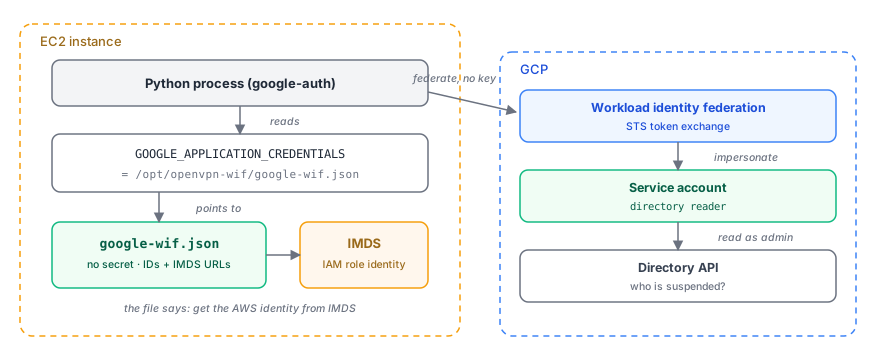
The instance side, end to end. A process reads GOOGLE_APPLICATION_CREDENTIALS, the file sends it to
IMDS for the instance identity, and the library federates that into GCP to read Workspace, with no key.
Get the file. It is the keyless stand-in for a service account key, a small external_account JSON.
Terraform can emit it as an output, or gcloud builds it from the pool and the provider:
gcloud iam workload-identity-pools create-cred-config \
  projects/481632064200/locations/global/workloadIdentityPools/openvpn-wif-pool/providers/aws-openvpn \
  --aws --enable-imdsv2 \
  --output-file=google-wif.json
Do not pass --service-account here. That flag writes a service_account_impersonation_url into the
file, so the library returns the service account already impersonated. The instance then impersonates the
service account a second time in the code below, which is the wrong shape and needs a Token Creator
binding the setup does not grant. The file only proves the instance’s AWS identity. The directory-reader
service account is named in the code, not in the file.
It holds no secret. It is a set of identifiers and the AWS metadata URLs the library reads to prove the instance’s identity:
{
  "type": "external_account",
  "audience": "//iam.googleapis.com/projects/481632064200/locations/global/workloadIdentityPools/openvpn-wif-pool/providers/aws-openvpn",
  "subject_token_type": "urn:ietf:params:aws:token-type:aws4_request",
  "token_url": "https://sts.googleapis.com/v1/token",
  "credential_source": {
    "environment_id": "aws1",
    "region_url": "http://169.254.169.254/latest/meta-data/placement/availability-zone",
    "url": "http://169.254.169.254/latest/meta-data/iam/security-credentials",
    "regional_cred_verification_url": "https://sts.{region}.amazonaws.com?Action=GetCallerIdentity&Version=2011-06-15",
    "imdsv2_session_token_url": "http://169.254.169.254/latest/api/token"
  }
}
{region} is a literal placeholder the Google client library substitutes at runtime. The file tells the
library where to go and ask who it is. The answer comes from the instance metadata service, which only
answers correctly on the instance that holds the role.
Put it on the instance. Drop it at /opt/openvpn-wif/google-wif.json, in plain text. Keep it out of
/etc/openvpn, or any directory your configuration management owns, which reaps files it did not put
there. Cloud-init is enough:
# cloud-init
write_files:
  - path: /opt/openvpn-wif/google-wif.json
    permissions: "0644"
    content: |
      { ...the external_account JSON above... }
Point the library at it. Set GOOGLE_APPLICATION_CREDENTIALS to that path. Any Google client reads
it as Application Default Credentials with no other configuration, so the Python that queries the
Directory API needs nothing more:
export GOOGLE_APPLICATION_CREDENTIALS=/opt/openvpn-wif/google-wif.json
import google.auth

# GOOGLE_APPLICATION_CREDENTIALS points at google-wif.json, so this just works.
source, _ = google.auth.default(scopes=["https://www.googleapis.com/auth/cloud-platform"])
That is the whole instance side: a file with no secret, a fixed path, and one environment variable. The rest of this section is the parts that were easy to get wrong.
Trap 1: the ARN you get is not the ARN you configure
When the instance calls AWS STS GetCallerIdentity, the identity that comes back looks like this:
arn:aws:sts::123456789012:assumed-role/openvpn-server-role/i-0abc123def456
The last part is the session name. For EC2 it is the instance ID. It is different on every instance, and it changes every time the Auto Scaling group replaces one. If you write your rule against that string, it matches one instance until the ASG replaces it.
That is what the attribute_mapping in the provider above is for. Its CEL expression normalizes the ARN
before anything compares it, reducing assumed-role/ROLE/SESSION to a stable assumed-role/ROLE. The
attribute_condition then pins that to one role. You authorize the role, not the session.
This is the same lock as the GitHub provider’s assertion.repository condition. AWS hands you the session
appended to the role and expects you to strip it yourself.
That lock is also the reason the credential file can sit in plain text.
Without it, the pool would accept any identity from the AWS account. With it, federation is pinned to
one role ARN. A copy of the file on your laptop is useless, because your laptop cannot produce a signed
GetCallerIdentity for that role. The file is public configuration that happens to name things.
Here is the difference worth keeping in mind. With a service account key, security depends on who can read the file. With federation, it depends on who can assume the role, which is already the thing your AWS account governs and audits.
One more rule: create no key, ever. Not even one you delete afterward. The service account should report zero user-managed keys for its whole life. That is one assertion in a test:
keys = iam.projects().serviceAccounts().keys().list(
    name=f"projects/-/serviceAccounts/{sa_email}", keyTypes="USER_MANAGED",
).execute().get("keys", [])
assert not keys, "WIF must be keyless"
Trap 2: domain-wide delegation without a key
This is the part I wrote the post for.
Domain-wide delegation lets a service account act as a human in your Workspace. You need it because the
Directory API answers questions about your users, and it wants an administrator to ask. Most guides do
this by loading a JSON key and calling .with_subject() on the credentials. Delegation needs only the
ability to sign a JWT as the service account, and Workload Identity Federation grants that through
signJwt. The Python library exposes it as a subject argument on impersonated credentials:
import google.auth
from google.auth import impersonated_credentials
from googleapiclient.discovery import build

SCOPE = "https://www.googleapis.com/auth/admin.directory.user.readonly"

# 1. Federation: our AWS identity becomes a Google token. No secret involved.
source, _ = google.auth.default(scopes=["https://www.googleapis.com/auth/cloud-platform"])

# 2 + 3. Impersonate the service account and act as a Workspace admin.
dwd = impersonated_credentials.Credentials(
    source_credentials=source,
    target_principal="openvpn-dir-reader@example-project.iam.gserviceaccount.com",
    target_scopes=[SCOPE],
    subject="admin@example.com",   # domain-wide delegation, keyless
)

directory = build("admin", "directory_v1", credentials=dwd, cache_discovery=False)
suspended = directory.users().list(customer="my_customer", query="isSuspended=true").execute()
The subject line is the whole trick. Google signs the delegation assertion for the service account, so
nothing that resembles a private key exists on the instance.
Two IAM bindings make it work, and you need both:
roles/iam.workloadIdentityUserlets the federated principal impersonate the service account.roles/iam.serviceAccountTokenCreatorlets it callsignJwt, which mints the delegation assertion.
Both go to a principalSet scoped to the pool, not to a user and not to a key.
One step you cannot automate. A Workspace super admin authorizes the service account’s client ID for the scope at admin.google.com/ac/owl/domainwidedelegation. There is no API and no Terraform resource for it. Everything else here is infrastructure as code. This is a person pasting two values into a form: a client ID and a scope.
The client ID is the service account’s numeric OAuth client ID, its unique ID. Terraform has it as
google_service_account.dir_reader.unique_id, or read it with
gcloud iam service-accounts describe SA_EMAIL --format='value(uniqueId)'. It is a long number, not the
service account’s email. The scope is the exact one your code requests,
https://www.googleapis.com/auth/admin.directory.user.readonly, the same one the Python above passes. The
admin authorizes that client ID for that scope and nothing wider; for more than one scope, list them
comma-separated.
The verifier below prints both, read from the instance, so in practice you copy them from its output.
Trap 3: the distro package cannot do this
On Ubuntu 24.04:
$ apt-cache policy python3-google-auth
python3-google-auth:
  Installed: 1.5.1-3
  Candidate: 1.5.1-3
Version 1.5.1 is from 2018. external_account, the whole federation mechanism, did not exist in
google-auth until 1.22, and impersonated_credentials is missing too. The package installs fine and
imports as google.auth, so dpkg -l says it is there. The failure arrives as an ImportError on a
submodule, and it reads like the library is not installed.
It is installed, and it is eight years and one major version behind. Do not rely on apt for google-auth.
Install it from pip into a virtualenv, and pin google-auth~=2.38. The keyless domain-wide delegation
flow this post relies on, subject= on impersonated_credentials, landed in 2.38.0 (January 2025). A
looser >=2 resolves to older 2.x releases where subject is not accepted, and you get a TypeError,
the same class of failure as the stale apt package above.
Trap 4: the two rejections mean opposite things
When delegation fails, Google returns one of two errors. The difference is the most useful debugging fact in this whole exercise:
| Error | Meaning |
|---|---|
invalid_grant: Invalid email or User ID | The subject does not exist. Google cannot find them in the Workspace. |
unauthorized_client | The subject is fine. The client ID is not authorized for the scope. |
We used it as a probe. A guessed admin address returned invalid_grant. A real one returned
unauthorized_client. Same code, same config, different error. That told us the subject was now valid
and only the console step was left. No extra tooling.
Those two are delegation errors. A third rejection can surface at the same step and is not about
delegation at all: SERVICE_DISABLED: Admin SDK API has not been used in project NNN before or it is disabled. That means the project is missing admin.googleapis.com, which the module enables. If you see it,
enable the API. No amount of patience with the console will fix it.
One more thing that will cost you time if you do not expect it. Authorization is not instant. Click
Authorize, re-run right away, and you still get unauthorized_client. Wait a few minutes. We watched one
run fail and the next one pass with nothing changed between them.
Build a verifier, not a log line
Four delegated links, and each one can only tell you 403. That is a bad place to debug from. So we wrote a checker that tests each link in order:
$ sudo /opt/openvpn-wif/verify-wif.sh
=== Tier 1: AWS identity ===
IMDS instance role: openvpn-server-role
STS caller ARN:     arn:aws:sts::123456789012:assumed-role/openvpn-server-role/i-0abc123def456
Normalized ARN:     arn:aws:sts::123456789012:assumed-role/openvpn-server-role
PASS Tier 1: instance ARN matches the locked role
=== Tier 2: federation exchange (AWS role -> GCP token) ===
PASS Tier 2: federated token minted: ya29.d.c0AZ4bNp... ...
=== Tier 3: impersonate directory-reader SA ===
PASS Tier 3: SA-impersonation token minted: ya29.c.c0AZ4bNp... ...
=== Tier 4: domain-wide delegation -> Directory API ===
PASS Tier 4: read suspended users via DWD: []
=== All requested tiers passed ===
Tier 1 is the AWS identity and makes no Google call. Tier 2 proves federation and the attribute condition. Tier 3 proves the two IAM bindings. Tier 4 proves delegation. A failure at tier n means links 1 to n-1 are healthy. That turns “403 from Google” into a one-line diagnosis.
Two properties turned out to matter more than we expected.
It is read-only: it checks and reports, and never installs a package or writes a file. A tool that changes the system it is diagnosing cannot be trusted, and it cannot be run casually in production.
It needs no arguments. Terraform already knows the service account, the client ID, and the locked role
ARN, so it writes them to an environment file next to the script. The operator runs one command. When
delegation is not authorized yet, tier 4 fails and prints the exact client ID and scope to paste into the
console, read from the instance, so there is no digging through terraform output or gcloud.
One note from deployment. Put those files where your configuration management doesn’t own them. We first
wrote them into /etc/openvpn/, and the tooling that manages that directory reaped them after boot.
/opt/ fixed it.
Beyond the Directory API
This is not specific to the Directory API. Any Google API a service account can reach works the same way from EC2. Change the scope, and the subject if you need delegation. Once the pool and provider exist, the next use case is cheap.
Coming from AWS
If you come from AWS, the protocols are identical (OIDC, a token exchange, a short-lived credential). Only
the vocabulary and the shape differ. The GitHub Actions setup is the AWS setup with the nouns swapped:
aws-actions/configure-aws-credentials becomes google-github-actions/auth, an IAM OIDC provider becomes
a workload identity pool provider, a trust policy condition becomes an attribute_condition. The map:
| AWS | GCP |
|---|---|
| IAM role | service account |
| instance profile | service account attached to a VM |
sts:AssumeRole | service account impersonation (generateAccessToken) |
sts:AssumeRoleWithWebIdentity | STS exchange against a workload identity pool |
| IAM OIDC identity provider | workload identity pool provider |
| trust policy | IAM policy on the service account |
| permission policy | role bindings on other resources that name the service account |
trust policy Condition | CEL attribute mapping and attribute condition on the provider |
| account | project |
| organizational unit | folder |
| ARN | full resource name |
| access key pair | service account JSON key |
A few places the shape bites an AWS person. A service account’s IAM policy says only who may impersonate it. Its permissions live elsewhere, in bindings scattered across other resources, so to find them you search the hierarchy. IAM also inherits downward, where a binding at org, folder, or project applies to everything under it. AWS SCPs only constrain. GCP bindings grant. Most examples bind at the project, one blast radius too wide.
Federation gives you a principal. Becoming the service account is a second step. AssumeRoleWithWebIdentity
makes you the role outright. GCP’s exchange makes you a federated principal that then impersonates the
service account. That impersonation carries its own binding, and you strip the session off the assumed-role
ARN yourself in CEL. Domain-wide delegation has
no AWS analog at all. Acting as a named human in a directory you do not administer is a Workspace idea bolted
onto IAM, and it ends at a web form. A project is not quite an account either. It links to a separate billing
account, and you enable each API on it (google_project_service). AWS services are just there. In
GCP’s favor, predefined roles are legible where AWS leaves you assembling JSON, and projects are near-free,
so per-service isolation is something you actually do.
The whole thing, both the GitHub and the EC2 side, is in the terraform-aws-openvpn module on GitHub. Read it, and file an issue if something does not work for you.
“No static keys anywhere” is the kind of answer that makes an enterprise security review go quickly. Getting there, with federation, GitHub-native CI/CD, and infrastructure you can actually audit, is weeks of work that does not move your product forward. That is what InfraHouse does: a production-ready AWS foundation, managed in GitHub and owned by you from day one, without hiring a DevOps team. If a customer security review is coming, book a 20-minute call.