The last post ended with a number and a promise. We had measured three ways to hand a 16 GiB model to a fleet; pointing every node at S3 won, flat at ~207 s whether the fleet was 4 nodes or 32. Then we took the artificial cap off to see how fast a node really pulls, and it stopped at 1.05 Gbit/s — which is 131 MB/s, which is the default throughput of a gp3 root volume. We had spent the whole exercise optimizing the network while the model queued behind a disk we never configured.
That was the number. This is the workup: what it means, why the disk is in the path at all, why the obvious fixes are less obvious than they look, and what it cost us in our own module.
Taking the shaper off
A word on the setup, because it matters. Through the whole experiment every node sat behind a
tc-shaped 700 mbit link. That cap is what made the comparison fair — each origin was
measured against the same per-node pipe, so the only variable was where the bytes came from.
But a cap also censors what you can see. A node that hits its ceiling only tells you the origin could deliver at least that much. So we set the rate to zero and ran the S3 fetch again with nothing throttling it.
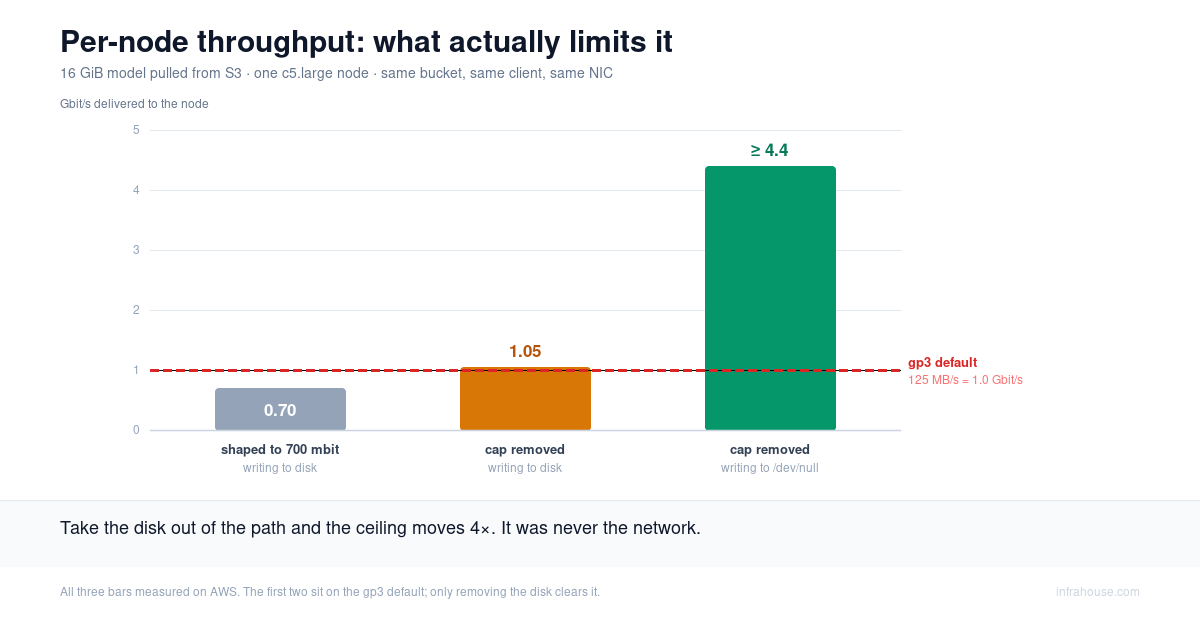
Per-node throughput went from 0.70 Gbit/s to 1.05 Gbit/s, and stopped.
That was a strange place to stop. A c5.large has a 0.75 Gbit/s network baseline and bursts to
10, so 1.05 sits in the middle of that range: high enough to prove we were spending burst
credit, far too low to be anywhere near the ceiling. And S3 had just saturated 32 of these at
once without breaking a sweat. Nothing obvious in the network stops a node at 1.05, so we went
looking for what does.
1.05 Gbit/s has a name
1.05 Gbit/s is 131 MB/s.
The root volume in the rig is gp3, created with no provisioned throughput. AWS’s default for
gp3 is 3,000 IOPS and 125 MB/s. Our measured 131 is about 5% over nominal, which is roughly
what you would expect with the page cache absorbing part of the write.
The node was writing to its disk exactly as fast as the disk would take it, and not one byte faster. We had spent a week measuring the network while the model was queued behind a volume we never configured.
One caveat we owe you, because it nearly bit us. The instance has an EBS ceiling of its own,
independent of the volume: a c5.large gets 81.25 MB/s sustained, bursting to 593.75 MB/s for
30 minutes once a day. Our run landed 16 GiB in about 131 seconds — comfortably inside the
burst window, where the instance allows 593 MB/s, far above the 125 the volume was actually
giving us. So the volume really was what bound this run. But that holds inside the burst
window, not in general. Had the pull run past 30 minutes, the instance would have fallen back
to 81 MB/s and taken over as the ceiling, and this would be a different post with a different
villain.
The control
An arithmetic coincidence is not a finding, so we ran a control. Same S3 bucket, same client,
same instance, same NIC, same everything — except the fetch wrote to /dev/null instead of to
the volume. Disk out of the path, nothing else touched.
Per-node throughput jumped to at least 4.4 Gbit/s, about 17.5 Gbit/s in aggregate across four nodes.
So S3 had been handing each node roughly four times what its disk could absorb, the entire time. Remove one variable, and the ceiling moves by 4×. The disk is the constraint, and it is not close.

The first two bars are the same story told twice: whether we capped the node at 700 mbit or took the cap off entirely, it landed on the gp3 default and stayed there. Only removing the disk clears the line.
What we didn’t chase
We don’t know what caps that 4.4. It could be the client — aria2 hard-limits at 16 connections, and 4.4 Gbit ÷ 16 works out to about 275 Mbit/s per stream, which is a plausible rate for a single S3 connection. It could be the NIC. It could be S3 itself.
It’s also a burst number, and we should say so: 4.4 is well clear of the c5.large’s 0.75
Gbit/s network baseline, so it’s what a node manages with credit in the tank, not what it holds
forever. That doesn’t weaken the comparison — the 1.05 disk-bound run was bursting too, on the
same instance type, so the two numbers are measured under the same conditions and the 4× gap
between them is real.
We didn’t find out, and we’re not going to. It is four times the disk’s throughput, and the disk is what binds. Chasing the next ceiling up would be a nice afternoon and would change no decision.
Why the disk is in the path
Where the model ends up isn’t in question — it ends up in GPU memory. The fair question is why the path is S3 → disk → GPU rather than S3 → GPU.
Part of that answers itself: S3 → GPU doesn’t exist. S3 speaks HTTP, and a GET lands in host memory. There is no DMA from an object store into VRAM. Every version of this is really S3 → host RAM → GPU, and the only thing up for debate is whether a file gets written on the way through.
It doesn’t have to be. Streaming loaders pull into host memory and hand off to the GPU with no filesystem in between. vLLM will take an object-store URL straight on the command line:
vllm serve s3://your-bucket/llama-3-8b --load-format runai_streamer
That reads safetensors concurrently out of S3 into GPU memory, and never writes a file. We haven’t run it. Take that path and the disk leaves the picture, and so does this post’s ceiling.
We keep the disk because it’s a cache, and the load you time is almost never the only load. The container restarts. The process crash-loops. Eight tensor-parallel ranks each read their slice. You put a second replica on the same node. With the file on local disk, every one of those is a page-cache read. Without it, every one is a fresh trip to S3 — you’ve swapped a bottleneck that one Terraform argument fixes for a per-load network bill that never goes away.
The other reason is that the loader wants a file. safetensors is built for exactly that: the format is laid out so a loader can mmap it and let the kernel page tensors in as they’re touched. Give it a path and it does the fast, boring thing. Take the path away and you’re on the streaming path above — real, newer, and not what most stacks do by default.
Worth noticing: our /dev/null control is loosely the streaming case, since no disk sits in the
path. It moved 4.4 Gbit/s per node. That’s roughly the shape of the ceiling you inherit if you
drop the file — you stop being disk-bound and go back to being network-bound, which is where we
thought we were the whole time.
Streaming is the real way to drop the file. The mount is the one that only looks like it. FSx for Lustre, EFS, and Mountpoint for S3 will all show the model as present while every byte still lives across the network, and the first read pays for the transfer lazily, page by page, as the model touches its own weights. Lustre’s pitch of starting before hydration finishes is real and useful — but the node goes available long before it goes resident, and only resident serves at full speed. The transport you skipped at the front comes back at first token.
Which is the thread running through this whole series. Whatever route you pick, the bytes move once and something has to absorb them at rate. Land them on disk and the disk sets your load time. Stream them and the network does. Defer them onto a lazy mount and your first token does.
Stopping writing to a 125 MB/s pipe
Three ways out, and we should be honest that we have measured the problem, not these fixes.
Provision throughput on the volume. gp3 goes to 1,000 MB/s, and it is one argument in
Terraform. Check the instance before you celebrate, though, because EC2 caps EBS throughput per
instance type independently of the volume. A c5.large tops out at 593.75 MB/s bursting and
81.25 sustained. The g5.2xlarge from the first post gets 437.5 bursting and 106.25 sustained.
So on that g5, a 1,000 MB/s volume hands you 437.5 during the burst window — still a 3.5× win
on a two-minute model load, which is exactly the shape of this workload — and then nothing at
all once credits run dry, because 106.25 is below the 125 default you were trying to escape.
Provisioning throughput is a real fix for burst-shaped loads. It is not one you can lean on
continuously.
Land the weights on local NVMe. Plenty of instances ship it — the g5.2xlarge from the
first post in this series has 450 GB of it
sitting there. It hangs off the instance rather than
the network, and its latency is a different class: roughly 20–100 µs against EBS’s 1–2 ms, worst
on writes. It also sidesteps the whole paragraph above, because instance-store traffic never
touches the EBS path: no volume limit, no per-instance EBS ceiling, no burst credits to run out
of. It disappears when the instance stops, which for a model you re-pull on every scale-out is
not a cost at all.
Keep it in RAM, if the model fits and you can spare the memory it would otherwise want for serving.
None of those are numbers we’ve run. We measured the ceiling; we’re telling you the mechanism and the figure to beat, which is 125 MB/s.
This is an old lesson
Before InfraHouse I ran database fleets at Pinterest, and we put MySQL on local-NVMe instances for exactly this reason. EBS write latency, especially durable fsync writes, was an order of magnitude worse than local NVMe, and for a database that gap is the whole ballgame.
The catch there was durability. Instance store is ephemeral, so you pair it with replication and accept the operational weight. That is the tax that makes NVMe a real decision for a primary datastore.
For model weights, that tax doesn’t exist. You already re-pull the model on every scale-out. The thing databases have to engineer around is free for you. Model serving gets the upside of this trade without the part that makes it hard.
Where this points next
Local NVMe isn’t only quicker to write to. With GPUDirect Storage, weights can move by DMA straight from NVMe into GPU memory, skipping the bounce through host RAM that the ordinary loader path takes. A plain EBS volume can’t do that. We haven’t tested it, and it belongs to the serving story rather than the distribution one, but it’s the reason the fast local disk matters beyond raw throughput: it can become a fast path all the way into the GPU.
The gap in our own module
Our terraform-aws-ecs module writes the model to the root EBS volume, and it offers no way to
mount the instance’s NVMe. The Experiment 2 notes say it plainly: “Root EBS, not instance-store
NVMe — the module exposes no instance-store mounting, and storage location is immaterial for an
untimed serving test.”
Immaterial for an untimed test. It became the binding constraint the moment we timed it. So a
g5.2xlarge running a model server has 450 GB of NVMe idle while the weights arrive over a
125 MB/s pipe. That’s a real gap, in our tool, found by measuring our own work. It’s tracked as
issue #170.
Worth saying clearly, though: for most fleets the gp3 default is completely fine. The 125 MB/s ceiling only bites when you push a large model to a lot of nodes quickly, or when load time is on your critical path. That’s a minority of teams. The recommendation isn’t “go change your volumes.” It’s “know where your ceiling is, and recognize it when you hit it.”
What to check
Before optimizing the network for model loading, measure the disk. The fetch itself against
/dev/null, or a plain dd, tells you the ceiling in one command. Then look up your instance
type’s EBS baseline and burst figures, because they cap the volume no matter what you provision
on it, and they’re easy to miss.
If your numbers show the disk binding — a big model, many nodes, a tight load-time budget — then land the weights on local NVMe if the instance has it, or provision throughput on the volume and confirm the instance can actually consume what you bought.
And if they don’t, leave it alone. gp3 goes to 1,000 MB/s; 125 is only a trap when you’re actually trying to push past it. EBS is not slow. The default is just a default, and we drove into it without looking.
InfraHouse builds production-grade AWS foundations for startups: Terraform-managed
infrastructure in repositories you own, production-grade CI/CD on GitHub Actions, and a
graduation path into your own AWS Organization with no rebuild. The
terraform-aws-ecs module used throughout
this series is open source — including the gap above. If you are putting a model-serving fleet
on AWS and want it built to pass a customer security review,
start with a 20-minute call.