The last post ended with a loose thread. The fetch step downloads the whole model to every node, every time a node comes up. That is fine for two nodes. It is not fine for 100.
There is a systems-design question that covers exactly this case, and it is a good one because the obvious answer is wrong by more than an order of magnitude.
You have a model in external storage behind a 10 Gbps downlink. You have 100 nodes. Distribute the model to all of them as fast as possible. How long does it take?
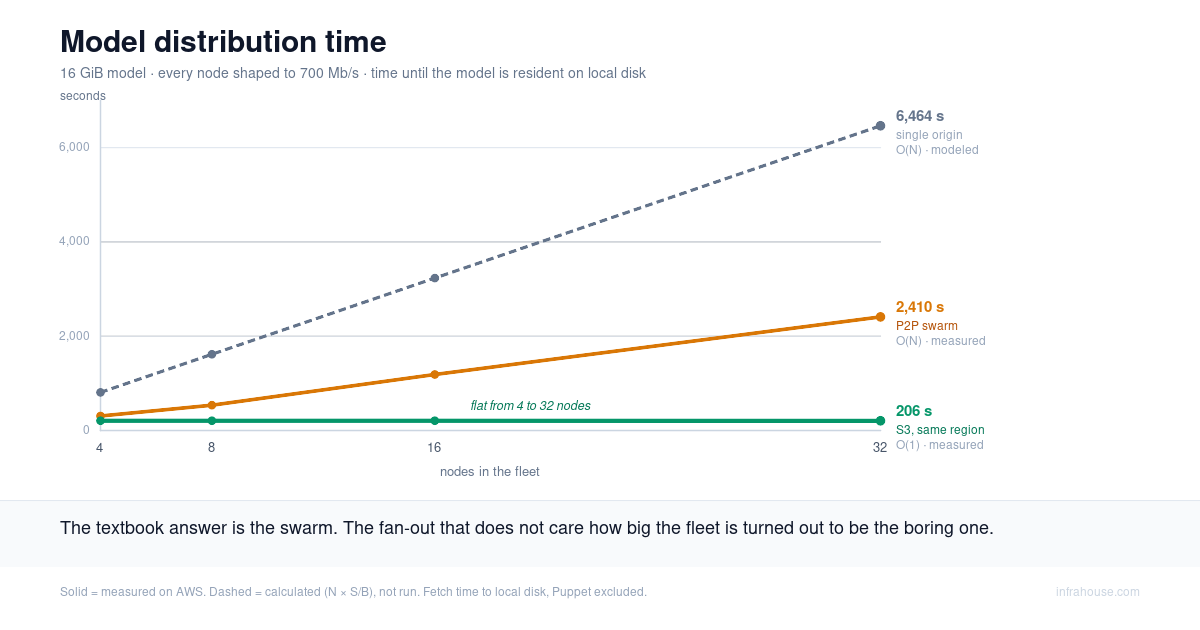
The textbook answer is a peer-to-peer swarm. We built one on real AWS, measured it against the alternatives at 4, 8, 16 and 32 nodes, and it lost — to the option nobody calls clever, which is pointing every node at S3.
Below is the math, the measurement, and where each approach belongs.
How to read the numbers
Every figure in this post is tagged. Measured means we ran it on AWS. Derived means arithmetic on values we measured. Modeled means a formula we did not run. Cited means somebody else’s published number. The distinction earns its keep here, because the measurement disagrees with the model.
One note on units before the arithmetic. “10 GB downlink” is ambiguous. Read it as a 10 Gbps link, about 1.25 GB/s. If you meant 10 GB/s, divide every wall-clock number in the next section by eight. The shape of the answer does not change.
What the math says (modeled)
Point all 100 nodes at the storage and let them download in parallel. Every copy crosses the
same downlink, so the link is the bottleneck and the work serializes through it. With N
nodes, a model of size S, and a downlink of bandwidth B:
T_naive = N × S / B
Take a 140 GB model, roughly a 70B-parameter model in fp16, and that 1.25 GB/s link:
T_naive = 100 × 140 GB / 1.25 GB/s = 11,200 s ≈ 3.1 hours
Three hours to hand the same file to 100 machines, and the time grows linearly with the fleet. Add 100 more nodes, add another three hours.
The fix is to stop treating the scarce link as the thing every node talks to. Pull the model across the expensive link once, then let the nodes copy it to each other over the internal network, which is cheap and abundant.
Doing that as a doubling tree — one node seeds two, two seed four — takes about log2(N)
internal rounds:
T_tree = S/B + ceil(log2 N) × S/B = 112 s + 7 × 112 s = 896 s ≈ 15 minutes
Doing it as a chunked swarm is better. Split the model into pieces so a node can forward piece one while still receiving piece two. This is how BitTorrent works. Every node becomes an uploader as soon as it holds anything worth sending:
T_swarm ≈ S/B + S/B = 224 s ≈ 3.7 minutes
Here is the part that matters, and it is not hand-waving. Total upload capacity in the
system grows as (N+1)·B, exactly as fast as total demand grows as N·S. The two cancel.
The fan-out is bounded by a single internal transfer no matter how many nodes you add.
| Approach | Formula | 100 nodes, 140 GB | Scales with fleet? |
|---|---|---|---|
| Every node pulls from one origin | N·S/B | ~3.1 hours | linearly — O(N) |
| Doubling tree | S/B + log2(N)·S/B | ~15 minutes | slowly — O(log N) |
| Chunked swarm | S/B + S/B | ~3.7 minutes | not at all — O(1) |
That table is the interview answer. It is also entirely modeled. We wanted to know what it does on real infrastructure.
What we built (measured)
A rig of plain EC2 instances: one seed holding the model, and a worker fleet that pulls it. No GPUs — distribution has nothing to do with inference, and GPUs would only add cost and noise.
Every node in the rig, seed and workers alike, sits behind a tc-shaped 700 Mbit link.
Shaping both ends to the same rate is what makes the comparison fair: the per-node link is
held constant, so the only thing that varies between runs is where the bytes come from. The
payload is a 16 GiB synthetic model — four shards of incompressible random bytes, shaped
like a real 7B checkpoint on disk, so no transport can cheat by compressing.
A node is finished when every shard is resident on its local disk, confirmed by reading the files back. Not “ready to serve” — a node can answer a request while still paging weights over a slow mount, and that would flatter the wrong approach.
Getting that 700 Mbit link to be an honest 700 Mbit turned out to be its own problem, and its own post. For now, take it as given.
The single origin does what the math says (derived)
One 700 Mbit origin serving N nodes can only push one pipe’s worth. Every copy queues
behind the last, so T = N × S/B. We did not run this; the formula is tight and the
measurement would tell us nothing we cannot compute.
Using the same 16 GiB payload and 700 Mbit link, one copy takes 202 s. At 32 nodes:
T = 32 × 202 s = 6,464 s ≈ 1.8 hours
Our swarm did not swarm (measured)
We ran the peer-to-peer fan-out with aria2’s BitTorrent mode: the seed publishes a torrent, the workers join, and pieces move between peers over the same shaped links.
Cold-start fan-out, all nodes beginning empty:
| Nodes | Fetch time |
|---|---|
| 4 | 308 s |
| 8 | 536 s |
| 16 | 1,187 s |
| 32 | 2,410 s |
That is linear in the fleet. Doubling the nodes roughly doubles the time. The model said constant.
The tell is in the aggregate. Sum the bytes moved across the whole fleet and divide by the wall clock, and you get 1.66, 1.91, 1.73 and 1.70 Gbit/s at 4, 8, 16 and 32 nodes. The swarm’s total throughput never grew with the fleet. It sat at roughly 1.8 Gbit/s the whole way.
Now compare that to what the fleet could have done (derived). At 32 nodes, with every node
able to upload at 700 Mbit, the available upload capacity is 0.7 + 32 × 0.7 = 23.1 Gbit/s.
We used about 7% of it. Capacity that does not grow as peers join is not a swarm. It is a
fixed pipe, shared N ways, and it behaves exactly like one.
We did not investigate why. We used an off-the-shelf BitTorrent client, it did not produce swarm scaling in our setup, and improving BitTorrent clients is not our line of work. We make no claim about the tool beyond what we measured.
What we can say is that the textbook answer is real, because other people have built it (cited). Uber’s Kraken reports that cluster size does not significantly affect download speed, sustaining around 60% of each host’s link rate with thousands of peers joining at once. CNCF’s Dragonfly runs at Alibaba and Ant Group scale. Both achieve the O(1) the model promises.
Both are also platforms. A Dragonfly install is a Kubernetes deployment: a manager, a scheduler cluster, a seed tier, a daemon on every node, and MySQL and Redis behind it (cited, from their docs). That is the price of the interview answer. You buy it by adopting a distribution system, not by adding a torrent client to your nodes.
Pointing every node at S3 (measured)
Same rig. Same 700 Mbit link on every node. The only change is where the bytes come from: the model goes into an S3 bucket in the same region, and each worker pulls its own copy.
| Nodes | Fetch time |
|---|---|
| 4 | 207 s |
| 8 | 207 s |
| 16 | 207 s |
| 32 | 206 s |
Flat. One copy over a 700 Mbit link takes 196 s in theory; we measured 207 s, and the difference is protocol overhead. Every node saturates its own link, and S3 never becomes the shared bottleneck a single seed is. Against the swarm, S3 leads by 1.5×, 2.6×, 5.7× and 11.7× as the fleet grows, and the gap keeps widening.

The thing the swarm was supposed to give us — a fan-out that does not care how many nodes you have — is what we got by doing the simplest possible thing.
One detail that is doing real work here: same-region S3 traffic reaches EC2 for free through an S3 gateway VPC endpoint. Route the same bytes through a NAT gateway and you pay per gigabyte, on every scale-out, forever. The endpoint is four lines of Terraform and it is the difference between free and metered.
The correction we owe you (measured)
We expected the swarm to earn its keep on incremental joins. A fleet is already running, one node scales out, and it pulls from 32 warm peers instead of hammering an origin. That should be where peer-to-peer shines.
A node joining a warm swarm took 202 s. The same node pulling the same model from S3 took 207 s.
Both of those are the link rate. A single node downloading from a source that is not saturated
finishes in S/B, and it does not matter whether the source is 32 peers or an object store.
Being flat in fleet size is what any download from an un-saturated origin does. It is not a
property of peer-to-peer, and for a while we thought it was.
Where peer-to-peer earns its keep
The condition is bandwidth asymmetry: a thin pipe to wherever the model lives, and fat pipes between the nodes. Pull once over the expensive link, then share over the cheap one. When that asymmetry exists, a swarm converts it into real speed.
It exists in an on-premises datacenter with a capped WAN uplink and a fast local network. It exists in air-gapped environments, and anywhere you cannot stand up a central store. It exists when your upstream rate-limits you — the Hugging Face 429s from the last post are exactly this shape.
On AWS, in-region, S3 is the fat pipe. There is no asymmetry left to exploit, so a swarm has nothing to sell you. That is the whole boundary, and it is worth knowing which side of it you are on before you go shopping for a distribution platform.
Where a shared filesystem sits (modeled)
We did not measure FSx for Lustre, so we will not pretend to a number. The shape is predictable enough to reason about.
A shared filesystem serves N nodes out of the throughput you provisioned, so distribution
time is N × S ÷ provisioned throughput — linear in the fleet, with a slope you buy. At the
1,200 GiB SSD floor, that is about 146 MB/s of aggregate throughput, shared across every node
reading at once.
Lustre’s argument was never fan-out speed. It is one versioned source of truth, no per-node copy of the weights, and lazy loading so a node can begin reading before the whole file has landed. Those are operational properties, and the last one is a serving-latency question we did not test.
The link rate was never the network (measured)
We removed the shaper to find out how fast S3 really is when nothing is holding it back.
Each node pulled at 1.05 Gbit/s. That is 131 MB/s, which is the default throughput of a
gp3 root volume, near enough. So we ran the same fetch again, writing to /dev/null instead
of to disk. The same nodes, the same S3 bucket, the same client, moved at least 4.4 Gbit/s.
S3 was handing each node roughly four times what its disk could absorb. Whatever caps that 4.4 — the client, the NIC, S3 itself — we did not chase it, because it is four times the volume’s throughput, and the volume is what binds.
There is a lever here that most fleets leave on the floor. Plenty of instance types ship
local NVMe: a g5.2xlarge, the GPU instance from the last post, comes with 450 GB of it.
That storage hangs off the instance rather than the network, and its throughput is an order
of magnitude beyond a default gp3 volume. It disappears when the instance stops, which is
exactly right for a model you re-fetch on every scale-out anyway.
So if the instance gives you local SSD, land the weights on it. If it does not, provision throughput on the EBS volume instead of accepting the 125 MB/s default — that default is the trap. We have not measured either option yet, and we are not going to pretend we have.
Which means the number we spent this whole post optimizing, the one every approach was racing against, was our root disk wearing a network’s clothes. The serving fleet in the last post wrote its weights to that same root volume, with 450 GB of NVMe sitting unused on the instance. That is the next post.
What to build
Put the weights in S3, in the same region, behind a gateway endpoint. Every node pulls at its own link rate, the time stays flat as the fleet grows, and the egress is free. It is the boring answer, it is four lines of Terraform, and it beat the clever one by 11.7× at 32 nodes.
Reach for a distribution platform — Dragonfly, Kraken — when you have genuine bandwidth asymmetry, or a fleet large enough that operating one is cheaper than the bytes it saves. Reach for a shared filesystem when you want a single versioned source and no local copies, and price the throughput carefully, because that is the number that sets your speed.
And measure your disk before you optimize your network. If the instance ships local NVMe, land the weights there. If it does not, provision throughput on the volume rather than taking the 125 MB/s default.
If you want to put your own numbers against this, the model size, fleet size, and storage choices are all in an interactive calculator. Its inputs are modeled, not measured, and it will tell you where the crossovers land for your fleet.
InfraHouse builds production-grade AWS foundations for startups: Terraform-managed
infrastructure in repositories you own, production-grade CI/CD on GitHub Actions, and a
graduation path into your own AWS Organization with no rebuild. The
terraform-aws-ecs module used throughout
this series is open source. If you are putting a model-serving fleet on AWS and want it built
to pass a customer security review, start with a 20-minute call.