An ML developer came to me with a model to serve. He had already made the decisions that matter most: an open model tuned for his use case, a vLLM container to run it, and a response-time target the product depended on. That combination is the reason you self-host in the first place. A hosted inference API gives you someone else’s general model on someone else’s schedule. Running your own tuned weights, in your own region, with latency you control, means running the model yourself.
My instinct was ECS. We already run ECS for everything, so it was the obvious place to put one more container. It was only while wiring it up that I learned ECS gives you a GPU on EC2 but not on Fargate. We run ECS on EC2 — a choice made earlier for unrelated reasons — so the GPU path was already open. A serverless-first default would have quietly closed it. That is the first thing worth knowing here: the boring platform decision you made months ago decides which options you have when something new lands on your desk.
The developer brought the first cut as a pull request to our ECS module
(#159), adding a gpu_count variable.
I took it, built it out — GPU-aware autoscaling, automatic selection of the GPU-optimized ECS AMI,
a real GPU smoke test — and shipped it
(#162). Then I did the thing you should
always do with your own tooling: I tried to use it. I went to serve a public model end to end, and
that is this post. (We had actually started from a harder problem — distributing a model across a
large fleet — but you cannot distribute what you cannot yet serve, so serving came first.)
The setup, in one module block
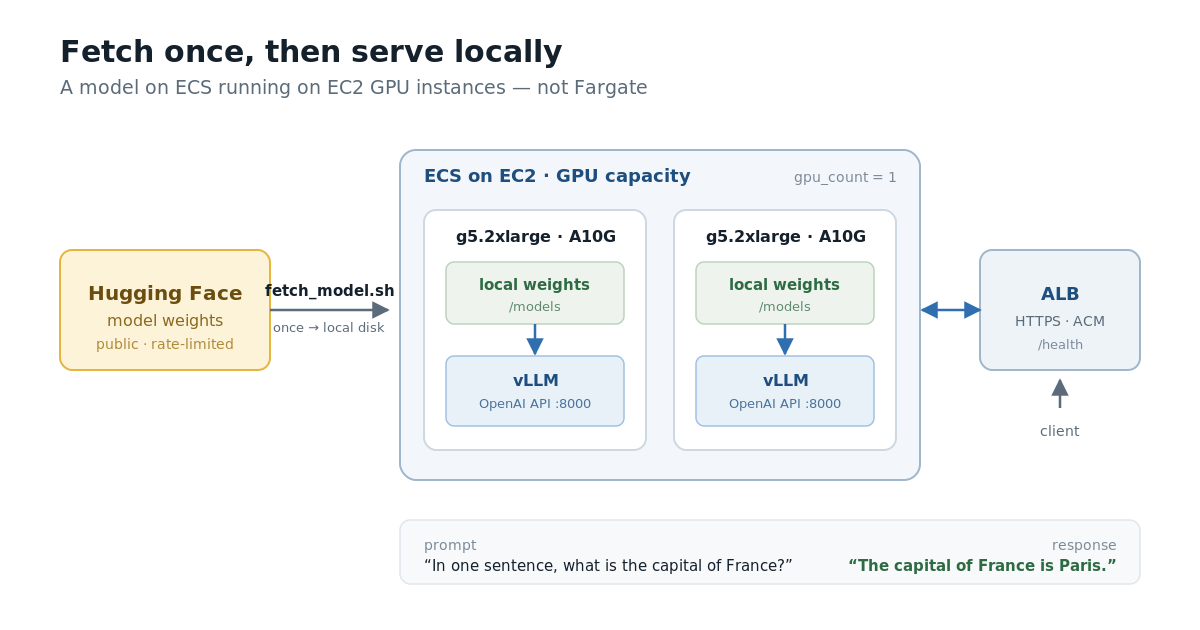
The fleet is two g5.2xlarge nodes, one A10G GPU (24 GB) each, running vLLM behind an Application
Load Balancer with an ACM certificate the module provisions and validates. The model is
Qwen/Qwen2.5-7B-Instruct — ungated, Apache-2.0, about 15 GB in bf16, which fits one A10G with room
for a usable context window. It stands in for the tuned model; the mechanics are identical.
The GPU ask is exactly what you’d hope:
module "vllm" {
  source = "registry.infrahouse.com/infrahouse/ecs/aws"

  service_name      = "vllm"
  docker_image      = var.docker_image   # our vLLM image, below
  container_port    = 8000               # vLLM's OpenAI-compatible API
  asg_instance_type = "g5.2xlarge"
  gpu_count         = 1                   # reserve one GPU per task
  # ...
}
With gpu_count = 1 and ami_id unset, the module reserves a GPU for the task, sizes the Auto
Scaling Group around GPU capacity, and boots the GPU-optimized ECS AMI so the agent advertises the
device. No driver wrangling. That part behaved.
Fetch, then serve
The first decision that matters is one I’d insist on in production: the container never runs
vllm serve <huggingface-repo-id>. It fetches the weights to local disk first, then serves the
local path. The entrypoint is two steps:
fetch_model.sh "$MODEL_SRC" "$MODEL_DIR"          # populate local disk

exec vllm serve "$MODEL_DIR/$MODEL_NAME" \
  --host 0.0.0.0 --port 8000 \
  --served-model-name "$MODEL_NAME" \
  --max-model-len "$VLLM_MAX_MODEL_LEN"
Letting vLLM pull from Hugging Face at serve time couples your production uptime to a third party’s availability and rate limits, and it re-downloads on every scale-out. Splitting the fetch out gives you one seam where the weight source can change — Hugging Face today; a mirror, a peer-to-peer swarm, or a shared filesystem later — without touching the serve command or rebuilding the image.
fetch_model.sh takes a source reference and a destination, switched by a FETCH_BACKEND
environment variable. For this post only one path is implemented — pulling a Hugging Face repo over
HTTP — and the others are honest stubs:
case "$FETCH_BACKEND" in
  http)
    case "$SRC" in
      hf://*)
        REPO="${SRC#hf://}"
        hf download "$REPO" --local-dir "$DEST/$(basename "$REPO")"
        ;;
      # https:// (a controlled origin) is for a later post
    esac ;;
  p2p|lustre) echo "deferred" >&2; exit 2 ;;
esac
One detail that will trip up anyone following older guides: huggingface-cli is gone. The current
tool is hf, and the fast transfer path is the hf_xet package, which the image installs. The old
hf_transfer backend and the huggingface-cli command no longer work.
Where the time actually went
The model takes minutes to load, and ECS won’t wait by default
vLLM’s /health endpoint only returns 200 once the model is fetched and fully loaded. On a fresh
GPU node that means downloading roughly 15 GB and loading it onto the GPU — several minutes during
which the container is up but not yet healthy.
ECS, left to its defaults, sees an unhealthy task and kills it. Then it starts another, which also takes minutes to load, and also gets killed. You get a crash loop where the model never finishes loading because nothing is allowed to live long enough to load it.
The fix is the health-check grace period. ECS ignores failing load balancer and container health checks for a configurable window after a task starts, so the scheduler leaves the task alone while the model loads:
healthcheck_path                          = "/health"
service_health_check_grace_period_seconds = 1200   # 20 minutes
asg_health_check_grace_period             = 1200
That single number is the difference between “the model serves” and an infinite restart loop. It is invisible until you hit it — exactly the kind of thing that does not show up in a quick proof of concept and does show up in production.
No curl in the image, and localhost lies
Two smaller traps, both in the container health check.
The vLLM image ships without curl, so the obvious health-check command does not exist. It does
ship python3, so the check goes through that:
  container_healthcheck_command = <<-EOT
    python3 -c "
    import urllib.request
    urllib.request.urlopen('http://127.0.0.1:8000/health', timeout=3)
    " || exit 1
  EOT
Note the 127.0.0.1. The first version used localhost and it failed. localhost can resolve to
the IPv6 address ::1 first, but vLLM binds IPv4 (--host 0.0.0.0), so the check connected to a
port nothing was listening on and reported the task unhealthy. Pinning the check to the IPv4
loopback fixed it. An hour of my life lives in that one substitution.
The defaults will OOM you
The module’s default container resources are small on purpose — container_cpu = 200,
container_memory = 128 MB — sized for a lightweight web service. A 15 GB model fetch and a vLLM
process need most of the machine, so with the defaults the container is OOM-killed during the
download before it loads anything. The serving task gets most of the g5.2xlarge:
container_cpu    = 7168    # of 8 vCPU
container_memory = 28672   # of 32 GiB, leaving room for the agents and OS
The weights land on the host at /var/models and mount into the container at /models, so a task
restart does not re-download a model already on the box.
A public service will rate-limit you, and you can’t do much about it
Pulling the weights from Hugging Face, you will eventually get an HTTP 429 — too many requests. It is a rate limit, it is downstream, and in the moment there is little you can do but back off and retry. An authenticated pull gets a higher limit than an anonymous one, retry-with-backoff smooths transient spikes, and Xet caching cuts the bytes — but none of it gives you control over someone else’s ceiling.
This is the strongest argument for the fetch-then-serve split. If a public service sits in your serving path, its rate limiter sits in your serving path. Fetch the model once to storage you own and a 429 on Hugging Face can no longer take your fleet down with it. It is also a preview of a bigger problem: one node catching an occasional 429 is an annoyance; a hundred nodes pulling from Hugging Face on a scale-out event is a thundering herd that gets you throttled at the exact moment you are trying to add capacity.
Proving it with a test
None of this counts unless it is repeatable, so the whole thing runs as a real integration test
(tests/test_experiment2.py). It is not part of
CI — it needs GPU quota and costs money — but it is one command:
- Build the vLLM image with
fetch_model.shbaked in, push it to a throwaway ECR repo. terraform applythe two-node GPU stack.- Poll
/healththrough the load balancer until the model is loaded. - Assert the weights are actually on the host — and they are, 15,242,841,820 bytes with a
config.jsonand.safetensorsshards present. - POST a real prompt to
/v1/chat/completionsand assert a well-formed answer. - Fire several more requests; the fleet served six of six.
The answer it returned:
PROMPT:   In one sentence, what is the capital of France?
RESPONSE: The capital of France is Paris.
Then it tears everything down. A full run is about $4 — two g5.2xlarge for roughly 90 minutes
including provision and destroy, plus the load balancer — and it destroys by default so nothing is
left idling.
What a CTO should take from this
The answer to the prompt is mundane on purpose. The decisions underneath it are what matter:
- You can serve models on ECS, and you do not need Kubernetes or a managed ML platform to do it. If your team already runs ECS, this is the operational surface they know — not a second thing to staff.
- It runs on EC2, not Fargate. GPUs require EC2. The platform default you set earlier decides whether GPU serving is even available to you.
- The model and the prompts stay in your AWS account. Self-hosting an open model means inference data is not sent to a third party — which is a real difference when you face a security review or compliance pressure.
- The cost is GPU instance-hours you can see and cap, not per-token. At steady utilization that can beat managed pricing; idle GPUs cost money, so it is a utilization question you can actually reason about, instead of a per-token bill you cannot.
- Your uptime should not hinge on a free public service’s rate limiter. Own the model artifact; fetch it once to storage you control.
- It is a capability, not a one-off. The hard parts live in the module and a repeatable test, so the next model is a configuration change, not another project.
That is the InfraHouse shape: real AWS, Terraform you own, the operational edges handled by someone who has hit them before. Give us a working image; you get a running service on AWS you own from day one, with no rebuild when you graduate to your own AWS Organization.
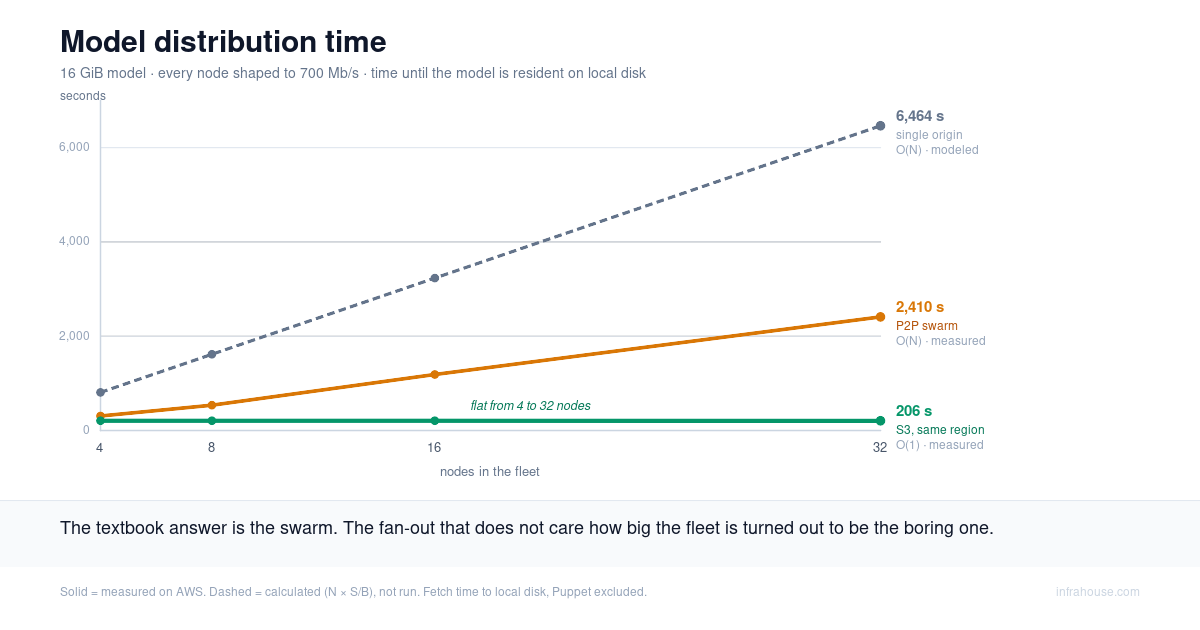
There is a loose thread worth pulling. The fetch step downloads 15 GB to each node, every time a
node comes up. That is fine for two nodes. It is not fine for a hundred, and it is the reason
fetch_model.sh carries those p2p and lustre stubs. Distributing a model quickly and cheaply
across a real fleet is its own problem, with some counterintuitive economics — that is the next
post.