One Repo to Rule Them All: Managing 100+ GitHub Repos With Terraform
- Oleksandr Kuzminskyi
- March 21, 2026
Table of Contents
I run infrastructure for a startup. When I joined, the GitHub organization had a handful of repos created by hand through the web UI. Permissions were assigned by clicking buttons. CI/CD was configured manually in each repository. Secrets were copy-pasted.
Today, a single Terraform repository called github-control manages over 100 GitHub repositories, their
branch protection rules, team permissions, CI/CD workflows, secrets, CODEOWNERS files, IAM roles, Terraform
state buckets, and drift detection — all automatically. Adding a new service to the company is a 15-line
map entry in a .tf file. The PR triggers a plan. The merge triggers an apply. Ten minutes later, the
service has a GitHub repo, two AWS environments (sandbox and production), IAM roles for CI/CD, Terraform
state storage, pre-configured workflows, and branch protection. No clicking. No tickets. No manual steps.
This post is about how we got here, what the system looks like, and where it breaks down.
The Service-Repo Pattern
The core idea is simple: a Terraform map where each entry describes a service, and a module that turns each entry into a fully provisioned GitHub repository with everything it needs.
Here’s what an entry looks like:
locals {
  service_repos = {
    "aws-control-browser" : {
      description = "AWS resources for the Browser service"
      repo_owner  = "ENG"
      committers = {
        eng_core : github_team.eng_core.id
      }
    }
  }
}

module "service_repo" {
  source   = "./modules/service-repo"
  for_each = local.service_repos
  repo_name        = each.key
  repo_description = each.value["description"]
  # ... dozens more parameters with sensible defaults
}
That’s the interface. You add an entry to the map, set a handful of fields, and the module handles everything else.
What “Everything Else” Actually Means
The service-repo module does a startling amount of work. For each map entry, it creates:
The GitHub repository itself — with the right visibility, merge settings (squash-only by default, delete branch on merge), vulnerability alerts, and auto-merge enabled. If a template repository is specified, the new repo is stamped from it.
Team permissions — committers get push access, admins get admin access, and the security team is automatically added to every repo. External collaborators can be specified per-repo.
Branch protection and rulesets — the default branch is protected with required reviews, status checks, and CODEOWNERS approval.
CODEOWNERS — auto-generated from the module configuration. The admin team always owns * (the
catch-all), the security team always owns .github/workflows/**, and individual repos can add team
ownership for specific paths. The file includes a comment warning people not to edit it by hand.
Two Terraform state buckets — one for sandbox, one for production. Each gets an S3 bucket and a DynamoDB lock table, provisioned in a dedicated TF-states AWS account.
IAM roles for GitHub Actions — using OIDC federation (no long-lived credentials), the module creates roles that GitHub Actions can assume. There’s a state-manager role (read/write to the state bucket) and an admin role (deploy resources) for each environment, plus a GitHub role that can assume into the others.
Pre-populated terraform.tf and terraform.tfvars — this one is subtle but important.
Terraform doesn’t allow variables in backend blocks — the S3 bucket name, DynamoDB lock table,
and IAM role ARN must all be hardcoded literals. You can’t parameterize them. In a normal workflow,
someone creates the state bucket, copies the ARN, pastes it into terraform.tf, looks up the lock
table name, pastes that too, finds the right IAM role — and hopes they got it all right. Multiply
that by 20 services across two environments and you have a full day of copy-paste and Slack messages
asking “what’s the state bucket for my service?”
The service-repo module eliminates this entirely. It creates the state bucket, the DynamoDB table,
and the IAM roles — then renders a terraform.tf from a template:
# terraform.tftpl — rendered by the service-repo module
terraform {
  required_version = "~> 1.5"
  backend "s3" {
    bucket  = "${bucket_name}"
    key     = "terraform.tfstate"
    region  = "us-west-1"
    encrypt = true
    assume_role = {
      role_arn = "${role_arn}"
    }
    dynamodb_table = "${dynamodb_table_name}"
  }
}
The rendered file is pushed directly into the new repo via github_repository_file. When a developer
clones the repo and runs terraform init, the backend is already configured, the IAM role is already
wired up, and CI/CD can plan and apply from day one. No manual steps. No room for typos.
GitHub Actions variables wired to AWS — this is where managing GitHub and AWS in the same module really pays off. The module creates IAM roles in AWS, then immediately sets them as GitHub Actions variables in the same repo:
resource "github_actions_variable" "role_github" {
  repository    = github_repository.repo.name
  variable_name = "role_github"
  value         = module.gha.github_role_arn
}

resource "github_actions_variable" "role_state_manager" {
  repository    = github_repository.repo.name
  variable_name = "role_state_manager"
  value = jsonencode({
    production : module.gha.state_manager_role_arn["production"]
    sandbox    : module.gha.state_manager_role_arn["sandbox"]
  })
}
The CI/CD workflow in the service repo just reads these variables — no hardcoded ARNs, no secrets to manage:
- name: "Configure AWS Credentials"
  uses: "aws-actions/configure-aws-credentials@v6"
  with:
    role-to-assume: "${{ vars.ROLE_GITHUB }}"
    aws-region: "${{ steps.extract_vars.outputs.REGION }}"
The IAM role, the region, the state bucket, the lock table — they’re all populated automatically
by github-control when the repo is created. The CI/CD workflow is generic. It doesn’t know or
care which AWS account it’s deploying to. It reads the variables, assumes the role, and runs
terraform plan. If the account changes, github-control updates the variables and the workflow
picks up the new values on the next run.
CI/CD workflows — terraform drift detection (runs on a randomized cron schedule to spread load), a secrets scanner, and a vulnerability scanner. All pushed as workflow files into the repo.
Webhooks — each repo gets a webhook that pings an internal GitHub bot for PR events.
Ownership tags — a .tags.json file with the owning team identifier, used for compliance tracking.
All of this happens on terraform apply. The developer who requested the new service never touches the
AWS console, never configures GitHub, never writes a CI/CD pipeline. They add a map entry, open a PR,
and get a working repo.
Centralized File Management
There’s another dimension to this that’s easy to overlook: github-control manages files inside
every repository. Not just the initial scaffolding — ongoing, enforced, overwritten-on-every-apply
files that keep the entire organization consistent.
The module maintains a files/ directory with ~20 templates. Every repo in the organization gets a
baseline set pushed via github_repository_file:
renovate.json— automated dependency updates, same config everywhere.github/workflows/vuln-scanner-pr.yml— vulnerability scanning on every PR.claude/CODING_STANDARD.md— the organization’s coding standards, enforced by AI code review.claude/instructions.md— Claude Code project instructions
Terraform module repos get additional files on top of the baseline:
- CI/CD workflows — automated Terraform review, GitHub Pages documentation generation, release automation, infrastructure security scanning (Checkov)
- Git hooks — pre-commit and commit-msg hooks for local validation
- Documentation scaffolding — MkDocs config, terraform-docs config, changelog generation
- Compliance files —
CONTRIBUTING.md,SECURITY.md,LICENSE
Most of these files use overwrite_on_create = true, which means Terraform tracks their content —
if someone edits them by hand, the next terraform apply restores them. This is intentional.
The coding standard, the workflows, the security policy — these aren’t suggestions. They’re organization policy, and they’re enforced
by the same tool that enforces branch protection and IAM roles.
The Claude Code integration is worth calling out. Every repo gets a .claude/CODING_STANDARD.md
that defines how code should be written — formatting rules, testing standards, Terraform conventions,
security requirements. When a developer uses Claude Code in any repo, it reads these instructions
automatically. The AI assistant enforces the same standards everywhere because the standards file is
managed centrally. Update the standard in github-control, apply, and every repo’s AI assistant
knows the new rules.
This is the kind of consistency you can’t get by writing a wiki page and hoping people read it.
Repository Tags (That GitHub Doesn’t Have)
AWS has tags. You can tag any resource with key-value pairs — environment=production,
team=engineering, cost-center=platform — and then filter, audit, and report on them. It’s one of
the most useful features in AWS.
GitHub has no equivalent. You can’t tag a repository with owner=ENG and then ask “show me all repos
owned by the engineering team.” There’s no metadata layer. If you want to track who owns what, you
either maintain a spreadsheet or dig through CODEOWNERS files.
So we built one. The service-repo module places a .tags.json file in every repository:
{
  "repo-owner": "ENG",
  "vanta-dependabot-owner": "alice@company.com",
  "vanta-ecr-container-owner": "alice@company.com"
}
The repo-owner field is required and validated — it must be one of ENG, INF, or PROD. The
Vanta fields are for compliance tooling that needs to know who’s responsible for each repository’s
security findings.
This is a small file, but it solves a real problem. Need to audit which team owns which repos?
grep across every .tags.json. Need to notify the right team when a vulnerability is found?
Read the tag. Need to generate a compliance report showing ownership for every service? It’s all
in version control, managed by Terraform, and impossible to forget.
The Two Maps
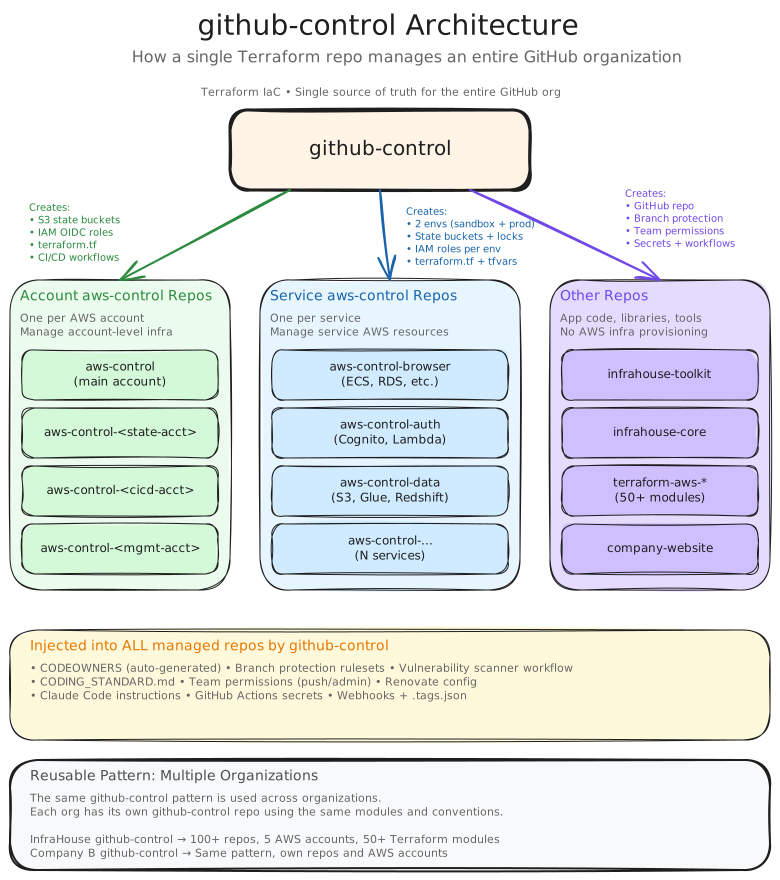
Actually, there isn’t just one map. The system has two primary for_each loops, each producing a
different type of repository:
local.service_repos — these are “aws-control” repositories. Each one manages AWS infrastructure
for a specific service. They get the full treatment: two environments (sandbox + production), state
buckets, IAM roles, and Terraform workflows. These are the repos where teams define their ECS services,
RDS instances, and everything else their service needs in AWS.
local.repos — these are everything else: application code, libraries, SDKs, schemas, internal
tools, the marketing website. They get the GitHub-side provisioning (repo, permissions, branch
protection, secrets, workflows) but through a different module that’s tailored for non-infrastructure
repos.
Between the two maps, there are roughly 120 repositories in the state.
In addition to these, there are specialized for_each loops for less common patterns — repos that need
Databricks credentials, repos that target specific AWS accounts (production, sandbox, root, audit), repos
with custom provider requirements. Each has its own .tf file: repos_databricks.tf, repos_prod.tf,
repos_sandbox.tf, and so on.
The CI/CD Flow
The github-control repo itself has a standard plan-on-PR, apply-on-merge flow:
- Developer opens a PR (adding a repo, changing permissions, updating secrets)
- GitHub Actions assumes an IAM role via OIDC
terraform planruns against the entire state- The plan output is uploaded to S3 and posted as a PR comment using
ih-plan, an InfraHouse tool that formats the output with affected resource counts and collapsible details - Team reviews the plan
- On merge, the CD workflow downloads the saved plan from S3 and runs
terraform apply - The saved plan is cleaned up
The concurrency group aws-control ensures only one plan or apply runs at a time — critical when you
have a single state file managing everything.
The 49-Minute Elephant
Here’s where it breaks down.
Every PR, regardless of what changed, runs terraform plan against the entire state. The state contains
over 1,000 resources across 100+ repositories. Terraform has to refresh every single one, check its
current state against the desired state, and compute a plan.
The last CI run took 49 minutes and 26 seconds.
Forty-nine minutes to find out that adding a single repository will create the expected 15 resources and touch nothing else. Forty-nine minutes during which the concurrency lock blocks every other PR. Forty-nine minutes of GitHub API calls, AWS API calls, and waiting.
This isn’t hypothetical pain. It means:
- PRs queue up. If three people need changes, the third person waits almost two and a half hours.
- Feedback is slow. You open a PR, go do something else, forget about it, come back an hour later.
- Small changes feel expensive. Need to rotate a single secret? That’s a 49-minute plan for a one-line diff.
- Drift detection is heavy. The same plan runs on a cron schedule to detect configuration drift. It takes the same 49 minutes.
The root cause is architectural: everything is in one state. Every repo, every IAM role, every state bucket, every webhook, every CODEOWNERS file. One state, one plan, one lock.
Why It Got This Way
It didn’t start at 49 minutes. It started at 2 minutes with 5 repos.
The single-state design made perfect sense initially. One place to see everything. One plan that catches all dependency issues. One apply that’s atomic. When you’re setting up a new organization’s infrastructure, having everything in one Terraform configuration is a feature, not a bug.
The for_each pattern compounds this. Each new map entry doesn’t add one resource — it adds 15-20
resources (repo, branch protection, team permissions, two state buckets, IAM roles, workflow files,
CODEOWNERS, tags, webhooks). The state growth is multiplicative. By the time you have 100 repos, you’re
managing 1,500+ resources in a single state.
And the GitHub provider is slow. Every github_repository_file resource requires an API call. Every
github_team_repository resource requires an API call. Every branch protection rule, every webhook.
The GitHub API has rate limits, and Terraform’s parallelism doesn’t help much when you’re rate-limited.
The Fix: Per-Repo State Isolation
The architecture we’re moving to splits the monolithic state into per-repo states with an orchestrator:
- Each repo gets its own Terraform state — adding a repo means planning only that repo’s 15-20 resources, not all 1,000+.
- An orchestrator detects which repos changed in a PR and runs plans only for affected repos.
- Shared resources (org settings, teams, org-level secrets) stay in a small, fast “core” state.
The expected improvement: from 49 minutes to ~30 seconds for a single-repo change.
This is a significant refactor. The state migration alone is delicate — you need terraform state mv
operations for every resource of every repo, and you can’t afford to get it wrong in production.
We’re working on it.
What I’d Do Differently
If I were building this from scratch:
Start with per-repo states from day one. The single-state convenience isn’t worth the scaling wall. The orchestrator is more work upfront, but the CI time stays constant as you grow.
Abstract the team structure earlier. The map entries reference GitHub team IDs directly
(github_team.eng_core.id), which couples every entry to the team structure. A mapping layer would
make reorganizations less painful.
The Broader Pattern
What makes this system valuable isn’t the specific implementation — it’s the pattern. A single repo that declares all repositories in the organization, with a module that auto-provisions everything a repo needs. The map becomes a source of truth for your entire GitHub organization.
Want to audit who has access to what? Read the .tf files. Want to ensure every repo has vulnerability
scanning? It’s in the module — every repo gets it automatically. Want to rotate a secret across 30 repos?
Change one data source. Want to onboard a new team? Add their team to the committers map for the
relevant repos.
The alternative — clicking through GitHub’s UI, writing Terraform by hand in each repo, maintaining CI/CD configs independently — doesn’t scale. It works for 5 repos. It’s painful at 20. It’s impossible at 100.
The 49-minute plan time is the cost of doing this in a single state. The per-repo split is the solution. But even with the scaling problem, I’d choose this architecture again. The consistency it provides — knowing that every repo in the organization is configured identically, that permissions are correct, that drift is detected — is worth the CI time.
For now.
This is the first post in a series about infrastructure automation patterns. Next up: how we’re splitting the monolithic state and bringing plan times from 49 minutes to 30 seconds.
I’m building these patterns into reusable, open-source Terraform modules at InfraHouse. If you’re managing GitHub organizations with Terraform and hitting similar scaling problems, I’d love to hear from you — book a chat.